Mechanical vs Electronic Shutter and Rolling Shutter
Mechanical vs electronic shutter: rolling shutter, banding under LED light, flash sync and which one to choose for each scene.
The mechanical shutter records the whole frame with two physical curtains; the electronic one reads the sensor row by row, and that is why it leans poles and bends propellers. From that difference come the three practical decisions: mechanical when there is flash or something crosses the frame fast, electronic when you need silence or speeds above 1/8000 s.
The short definition of the control (what it measures and in what steps it advances) is in shutter speed. Here are the artifacts of each type and when to switch from one to the other.
What exactly does the shutter do?
Two things, and the second is the one almost nobody looks at: it sets how long light reaches the sensor and decides when each part of the frame is recorded.
In a mechanical shutter, the first curtain opens and the second closes behind it. Below the sync speed the sensor is fully uncovered for an instant. Above it, the two curtains travel together forming a slit: the sensor is never fully open, and what you see in the photo is that slit sweeping across the scene in a few milliseconds.
The electronic shutter moves nothing. It starts accumulating charge in the top row of pixels, then in the next, and so on down; then it reads them out in the same order. The total time of that sweep is what causes all the artifacts that follow.
The three shutters and what each one costs
Type: Mechanical; What moves: Two curtains; Own artifact: Vibration at medium speeds (1/15–1/100 s) with a telephoto lens; Flash: Syncs up to the body's X speed; Noise: Audible clack
Type: Electronic first curtain (EFCS); What moves: Only the second curtain; Own artifact: Background blur clipped on one side at high speeds with very fast lenses; Flash: Same as mechanical; Noise: Almost silent
Type: Fully electronic; What moves: Nothing; Own artifact: Rolling shutter, banding under artificial light, less bit depth on some bodies; Flash: Normally disabled; Noise: Total silence
Type: Global; What moves: Nothing; Own artifact: None of note; Flash: Syncs at any speed; Noise: Total silence
The global shutter exists in some recent sensors and solves the problem by design: all pixels start and end at the same time. It is still the exception, so almost everyone's real choice remains among the first three rows.
EFCS is the sensible default for tripod work and long exposure: it eliminates the shock of the first curtain, which is one of the causes of soft images between 1/15 and 1/100 s with long focal lengths. At very fast speeds and with a lens open at f/1.4, on the other hand, it cuts the background blur circles at the top edge; if you see D-shaped bokeh, switch to mechanical.
What is rolling shutter and when will you see it?
The sensor takes a certain time to be read from top to bottom. If the subject moves during that time, the lower part of the frame is recorded at a different position from the upper part, and the result is a lean.
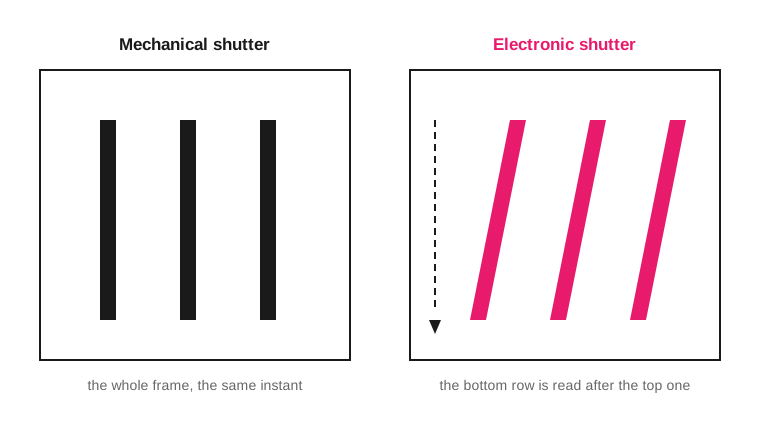
The same poles during a fast camera pan: straight with a curtain, leaning with row-by-row readout.
Where it really shows up: airplane and drone propellers, fan blades, car wheels, and above all the fast sideways sweep of the camera. A vertical in the background leans several degrees when you pan sharply with an electronic shutter, even if the subject is still.
Check it yourself in two minutes: set a ceiling fan to medium speed, take one photo in electronic and one in mechanical at 1/500 s, and compare the shape of the blades. That test tells you more about your particular body than any catalog figure, because the readout speed varies a lot from one sensor to another.
Why do color bands appear under artificial light?
Because the mains power doesn't give constant light. An LED or fluorescent lamp powered from the mains flickers at double the frequency of that mains: 100 times per second on a 50 Hz grid, 120 on a 60 Hz one. A full cycle lasts 10 ms or 8.3 ms respectively.
If the sensor's sweep takes longer than one cycle, each band of rows is recorded with a different amount of light and horizontal bands appear, sometimes with a greenish or magenta tint.
The three ways out, in order of reliability:
Switch to the mechanical shutter and turn on the body's anti-flicker setting if it has one: it delays the shot a few milliseconds so it falls on the peak of the cycle.
Use a speed that is a whole multiple of the cycle. On a 50 Hz grid: 1/100 s, 1/50 s, 1/25 s. On a 60 Hz grid: 1/120 s, 1/60 s, 1/30 s. Each one spans one or several complete cycles, so all the rows receive the same amount.
Lower the speed. At 1/30 s or slower the bands average out and disappear, at the cost of risking motion.
Check what frequency the grid uses in the country where you are shooting before setting the speed; it is not the same in all Spanish-speaking markets.
Up to what speed does the flash sync?
Up to the body's sync speed, which on most cameras falls between 1/160 and 1/250 s. Above it, the curtains form the slit and the flash lights only the strip that was uncovered at that instant: one bright band and the rest black.
The alternative is high-speed sync (HSS or FP), in which the flash stops giving a single burst and emits a continuous pulse while the slit travels across the sensor. It works, but it loses power, and loses more the faster the speed. Look up the exact sync figure in your body's manual: it is a per-model figure, not a constant.
With an electronic shutter, the flash is usually disabled for the same reason bands appear: the burst lasts less than the sweep and only lights part of the frame.
Which shutter do I use in each scene?
Scene: Sports, birds in flight, cars; Shutter: Mechanical or EFCS; Reason: The subject crosses the frame and rolling shutter deforms it
Scene: Ceremony, theater, conference; Shutter: Electronic; Reason: Total silence; the subjects move slowly
Scene: Any shot with flash; Shutter: Mechanical; Reason: It is the only one that syncs reliably
Scene: Under LED or fluorescent light; Shutter: Mechanical with anti-flicker; Reason: Avoids horizontal bands
Scene: Tripod, landscape, long exposure; Shutter: EFCS; Reason: No curtain shock and no long sweep
Scene: Very fast burst of a slow subject; Shutter: Electronic; Reason: More frames per second without wear
Scene: From a vehicle or a drone; Shutter: Mechanical; Reason: Vibration and displacement lean everything vertical
If your camera offers an "automatic" mode that decides for you, check what it chooses when you mount a flash: that is where it makes the most mistakes.
Frequently asked questions
Does the mechanical shutter wear out?
Yes: it is a moving part with a finite lifespan, which manufacturers publish as a number of shots for each specific body. The counter is written in the metadata of every file, so you can look it up with any EXIF reader. The electronic shutter has no mechanical wear of any kind.
Why do my photos with the electronic shutter come out with horizontal stripes?
It is the flicker of the artificial lighting, not a camera defect. Switch to the mechanical shutter or fix the speed at a multiple of the grid cycle: 1/100 s where the grid is 50 Hz, 1/120 s where it is 60 Hz.
Does the electronic shutter give worse image quality?
In heavily lifted shadows it can be noticeable, because some bodies reduce bit depth when reading in electronic mode. In normal light conditions the difference isn't visible; what is always visible is the deformation of fast subjects.
What shutter speed is safe handheld?
As a floor, the inverse of the equivalent focal length: 1/50 s with a 50 mm on full frame, 1/80 s with that same lens on APS-C. The numbers by focal length and the exceptions are in minimum handheld shutter speed.
What to leave set before heading out
Leave the body on EFCS as the resting position: it covers 90% of situations without curtain shock and without noticeable rolling shutter. Switch to mechanical when you mount a flash or when the subject is going to cross the frame, and to electronic only when silence matters more than geometry. How shutter speed fits with aperture and ISO is in the exposure triangle guide, and you can see the effect of each change without using battery in the triangle simulator.
The 44 Enfogram cards come with the speeds by scene and the sync settings printed, to consult with the camera in your hand and not from memory.