Advanced Gear and Maintenance
Knowing your gear's capabilities and limits maximizes results and avoids failures. Preventive maintenance extends its life and optical quality.

Store your gear below 60% relative humidity (between 40% and 50% is ideal) and clean the sensor only when you see spots when shooting at f/16 against a smooth sky. Those two habits prevent the two expensive failures: fungus inside the lens and scratches from an unnecessary cleaning.
Our cameras and lenses are tools. They shouldn't be an end in themselves, but knowing the capabilities and limitations of your gear prevents technical failures at the worst moment. Preventive maintenance extends service life and preserves optical quality. Smart investment should be based on real needs, not on specifications you will never use.
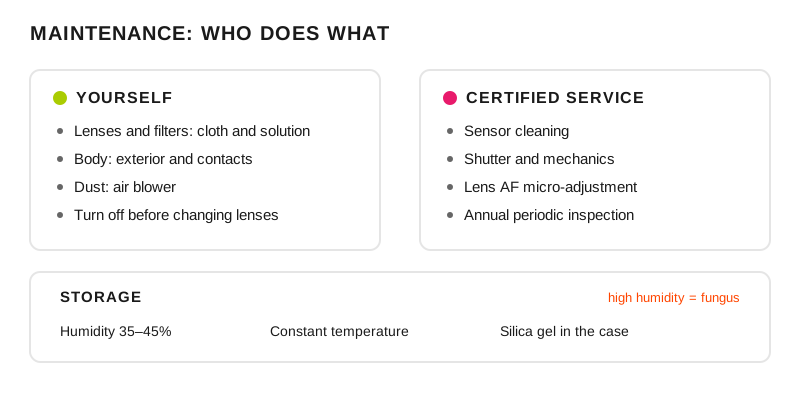
Split up the maintenance: basic cleaning at home, sensor and mechanics with a professional.
How do you care for your gear without taking it to the shop?
Regular, careful maintenance avoids repairs that cost more than the maintenance. Make sure to periodically clean the lenses and the camera body; the sensor, only when spots appear. To protect the gear, avoid dust and moisture. Use backpacks and cases designed with padded compartments to protect the gear during transport.
Turn off the camera before changing lenses or memory cards to avoid damage. Send the gear to authorized service centers for periodic checkups and more complex repairs. Store your gear in a place with low humidity and constant temperature to prevent fungus growth and condensation.
What do I check and when?
Task: Sensor cleaning; The signal that triggers it: spots visible at f/16 against a smooth sky or wall; Who does it: a certified professional; What happens if you skip it: hours of cloning on every sky photo
Task: Focus calibration; The signal that triggers it: the sharp point falls in front of or behind in a test at the distance you use most; Who does it: you, with a target, or the technical service; What happens if you skip it: portraits with a sharp ear and a soft eye
Task: Optics cleaning; The signal that triggers it: fingerprints or smudges visible against the light; Who does it: you, with a blower before a cloth; What happens if you skip it: veiling and reflections in backlit shots
Task: Humidity control; The signal that triggers it: stored above 60% humidity; Who does it: you, with silica gel or a dry cabinet; What happens if you skip it: fungus inside: repair or loss
Task: Field protection; The signal that triggers it: rain, sand, salt spray or sudden temperature changes; Who does it: you, with covers and sealed bags; What happens if you skip it: condensation inside the body
Task: Gear backup; The signal that triggers it: paid work where you can't redo the shot; Who does it: you, before accepting the job; What happens if you skip it: a wedding without a second camera
Calibration only makes sense if you know which focus mode you were using when it failed: half of the "miscalibrated lenses" are really continuous AF set on a still subject, something the focus systems guide clarifies. Protection in rain, sand or cold has its own protocol in the extreme conditions guide.
What do I carry in the maintenance kit?
Cleaning kit: sensor cleaner, liquid solution for lenses and sensor, rocket air blower, for troubleshooting on location.
Calibration: focus target, specific distance, multiple tests.
Transport: hard cases for travel, proper padding.
Monitoring: regular checks of AF accuracy and optical quality.
The mistakes that end up as a repair bill
Cleaning the sensor with incorrect techniques (permanent scratches).
Not calibrating new lenses (undetected back/front focus).
Exposure to humidity without protection (internal fungus).
Transporting gear without adequate protection.
Professional tips
Maintenance routine: external cleaning after every intensive use; the sensor, only when spots appear and, preferably, by a camera maintenance professional.
Calibrate all your lenses with a specific chart at the distances you use most.
Always carry a basic cleaning kit and emergency tools.
Well-cared-for gear gives excellent results.
Frequently asked questions
How often should the sensor be cleaned?
When spots appear, not on a calendar. The test takes twenty seconds: shoot at f/16 against a clear sky or a blurred white wall and look at the image at 100%; if you see dark dots repeated in the same position across several shots, it is dust on the sensor. If you don't see them, opening the camera only adds risk.
How do I know if a lens focuses in front or behind?
With the camera on a tripod, a single focus point, maximum aperture and a printed target at the distance at which you usually use that lens: focus on the center mark and check where the sharpness really falls. Repeat five times, defocusing between shots, because a single test can be a focus miss and not a pattern.
Is a UV filter useful for protecting the lens?
As mechanical protection against sand, splashes and knocks on the front element, yes, and on the beach or in the mountains it is worth it. Optically it adds two more air-glass surfaces, so against the light it increases reflections and veiling: the sensible position is to keep it on in the field and take it off when you shoot toward the light source.
How do I prevent fungus in lenses?
By storing them in a dry, ventilated place with a stable temperature, with silica gel inside the cabinet or in a dry cabinet, and without leaving them for months in a closed backpack. Fungus grows in humidity and in still darkness; taking the gear out and using it is, without irony, part of maintenance.
What to check before a job
Batteries charged and a spare, cards formatted in the camera, a spot test at f/16, and the backup of whatever you can't repeat. On when it makes sense to buy that second body there is a comparison in second camera: when and which, and the deep-cleaning routine is in cleaning and maintenance.
The 44 Enfogram cards come with the field checks printed, to go over them in the backpack before heading out and not on the way back.