File Management and Photography Workflow
A good digital workflow saves hours and prevents losses: organization makes the difference between producing and searching for files.

A good digital workflow saves you hours and prevents catastrophic losses. Organization is not "boring"; it is the difference between being productive and wasting time searching for files. The system must be consistent, scalable and easy to maintain. Backup is not optional: it is the difference between having a career and losing years of work.
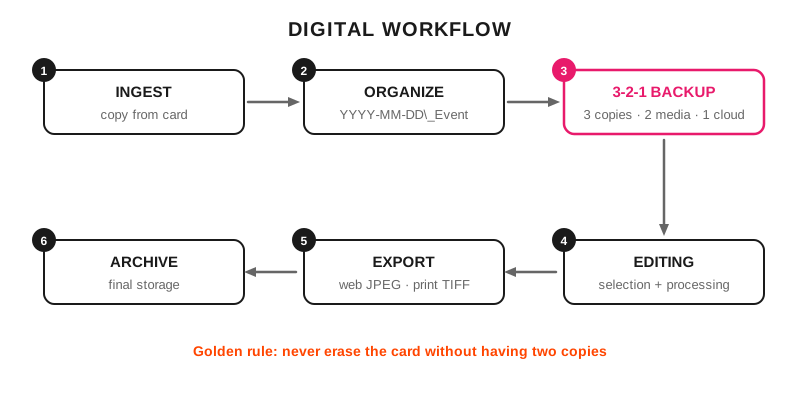
Six chained steps: from dumping the card to the final archive, with the 3-2-1 backup as the critical step.
File management, an essential part of the photographic craft
A solid workflow lets you access your photos quickly, edit them efficiently and deliver them to your clients to a high standard.
An amateur accumulates thousands of files without control.
A professional handles their output with order and confidence.
Avoid stress and wasted time. If you spend more time searching than editing, you need to be more organized in the way you work. Make your photo archive as solid as your visual portfolio.
Practical application
Folder structure: Year/Month/Event with clear descriptive names.
Consistent naming: YYYY-MM-DD_DescriptiveEvent_001.
3-2-1 backup: 3 copies, 2 different media, 1 off-site or in the cloud.
RAW workflow: import, select, process, export, archive.
What setup do I use?
Software: Adobe Lightroom or Adobe Bridge for organization, Photoshop for specific editing.
Cards: class 10 minimum, format in camera after the backup.
Storage: main hard drive + external backup + cloud.
Export: high-quality JPEG for web, TIFF for print.
What mistakes should you avoid?
Not backing up immediately after a shoot.
Inconsistent naming that makes future searches difficult.
Accumulating files without culling (a drive full of mediocre photos).
Relying on a single storage method.
Professional tips
Golden rule: never erase the card until you have two copies of the file.
Use keywords in Lightroom or Bridge for quick searches by subject.
Always export with copyright metadata embedded.