Diaphragm vs. Aperture vs. F-Number Explained
The diaphragm is the blades, the aperture is the opening they leave, and the f-number is focal length divided by its diameter. So f/2 is wider than f/8.

Three words that almost everyone uses as synonyms name three different things. The metal blades inside the lens are the diaphragm; the opening they leave when they open is the aperture; the f-number is the focal length divided by the diameter of that opening. On a 50 mm, f/2 means 50 ÷ 2 = a 25 mm hole. The same lens at f/8 leaves 6.3 mm. Nobody says the word "divided," and that is why the scale seems to run backward.
What is the diaphragm in photography?
The diaphragm is a mechanism: a ring of curved, overlapping blades inside the lens barrel, between the glass elements. As it turns, the blades advance toward the center and narrow the passage of light.
None of that is in the camera body. The shutter, which controls time, is there, in almost any current interchangeable-lens camera, and confusing the two leads you to look for the diaphragm in the wrong menu.
An electronically controlled lens keeps the diaphragm fully open while you compose, so the viewfinder is bright and the autofocus has light, and closes it to the chosen value at the instant of the shot. A manual lens with an aperture ring stays at whatever value you set. The depth-of-field preview button closes it early so you can see the scene as the sensor will see it.
What is the difference between diaphragm, aperture and f-number?
Term: Diaphragm; What it is: The blade mechanism; Where it is: Inside the lens barrel; What it is measured in: Number of blades
Term: Aperture; What it is: The circular opening they leave; Where it is: The same place: it is the empty space; What it is measured in: Diameter, in millimeters
Term: F-number; What it is: Focal length ÷ aperture diameter; Where it is: Nowhere, it is a ratio; What it is measured in: f/1.4, f/2, f/2.8…
The third row clears up the misunderstanding: the f-number does not measure anything physical about the lens. That is why it is written with a slash, like a fraction.
Why does a bigger f-number mean a smaller hole?
Because it is in the denominator. Divide the focal length by the f-number and you have the diameter of the opening:
F-number: f/2; 24 mm: 12 mm; 50 mm: 25 mm; 200 mm: 100 mm
F-number: f/2.8; 24 mm: 8.6 mm; 50 mm: 17.9 mm; 200 mm: 71.4 mm
F-number: f/4; 24 mm: 6 mm; 50 mm: 12.5 mm; 200 mm: 50 mm
F-number: f/5.6; 24 mm: 4.3 mm; 50 mm: 8.9 mm; 200 mm: 35.7 mm
F-number: f/8; 24 mm: 3 mm; 50 mm: 6.3 mm; 200 mm: 25 mm
F-number: f/11; 24 mm: 2.2 mm; 50 mm: 4.5 mm; 200 mm: 18.2 mm
F-number: f/16; 24 mm: 1.5 mm; 50 mm: 3.1 mm; 200 mm: 12.5 mm
Two caveats. The printed f-numbers are rounded (f/2.8 is really 2.828), so the diameters come out approximate. And what is measured is not the bare opening between the blades: it is the entrance pupil, that opening seen through the glass in front of it, which magnifies it.
Look at the f/2.8 row. A 24 mm opens 8.6 mm and a 200 mm opens 71 mm: a surface about 69 times larger, and yet both photos come out equally exposed, because the telephoto spreads that light over a much larger image of the same subject. That is the job of the ratio: f/2.8 means the same thing on any lens when you are talking about light, but not when you are talking about blur, which depends on the physical diameter and the distance.
Where does the 1.4 · 2 · 2.8 · 4 scale come from?
The light that enters depends on the area of the circle, and area grows with the square of the diameter. To let through half the light you have to halve the area, and to do that the diameter is divided by the square root of two: 1.414.
The whole series comes from there, each value multiplied by 1.414: 1 · 1.4 · 2 · 2.8 · 4 · 5.6 · 8 · 11 · 16 · 22. The last two are rounded from 11.3 and 22.6. One step on that scale equals exactly one step of shutter speed or ISO, which is the entire mechanism of the exposure triangle.
The diaphragm blades seen from the front of the lens
With the lens mounted and set to f/8, press the depth-of-field preview button and look in through the front against a light wall. You will see a polygon, not a circle. Count the sides: that is the number of blades.
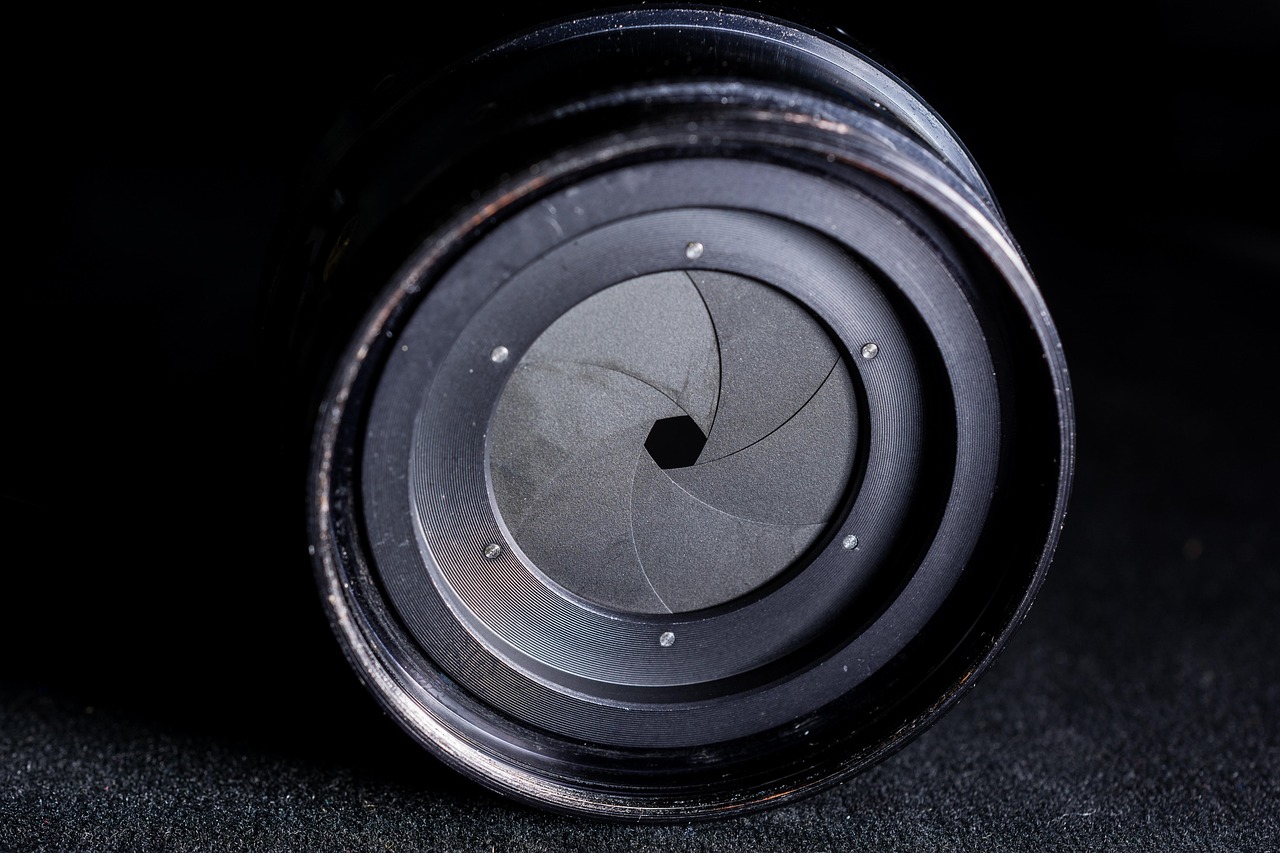
That polygon is printed on every out-of-focus point of light. Few straight blades draw background streetlights shaped like a nut; many blades, or curved blades, leave them almost round. At maximum aperture the blades move out of the way and the opening is defined by the barrel: points in the center come out round, but toward the corners the barrel clips the pupil on one side and leaves them cat's-eye shaped. Stopping down one step does both things at once: it rounds the corners and brings out the polygon across the whole frame. The size of those discs depends on aperture, focal length and distance; it is broken down in how to get perfect bokeh.
How many blades your lens has can't be deduced from its price or focal length: it is in the spec sheet, under "blades" or "diaphragm blades."
Why does the sun come out with 14 points if the diaphragm has 7 blades?
Each straight edge of a blade diffracts the light from a bright point into two opposite rays, perpendicular to that edge. The rest is geometry:
Even number of blades. Opposite edges are parallel, their rays overlap and you see as many points as blades. 8 blades → 8 points.
Odd number. No edge has another parallel to it, so each contributes its own pair of rays. 7 blades → 14 points; 9 blades → 18.
The points appear when stopping down, as the edges become long and straight: around f/11 and with full effect at f/16. In full sun with the sun high, ISO 100 and f/16 put you at 1/100 s by the sunny 16 rule, and the sun peeking right over the edge of a rock sharpens the star. The cost: at f/16 any speck of dust on the sensor shows up in the photo, and overall sharpness drops from diffraction.
Why not just stop down to f/22?
Because when you narrow the hole, light diffracts at its edge and every point in the image becomes a tiny disc. That disc grows with the f-number (the ratio again, not the diameter) and beyond a certain value it exceeds the pixel, so the whole image loses detail equally, whether in focus or not.
On full frame, diffraction starts to be noticeable from f/11 and is evident at f/22. On APS-C the threshold comes sooner, around f/8, and on Micro Four Thirds around f/5.6, because the pixel is smaller. Stopping down two steps too far "just in case" trades a few centimeters of in-focus zone for detail across the whole frame.
And stopping down costs light. From f/8 to f/16 is two stops: in full sun at ISO 100, 1/400 s becomes 1/100 s, which can be handheld with a wide angle but no longer with an unstabilized 200 mm. Before paying that price, work out how much sharp zone you really need with the depth of field calculator. Which f-number each scene calls for is in the table in the aperture glossary entry.
Frequently asked questions
Are diaphragm and aperture the same thing? No. The diaphragm is the blade mechanism and the aperture is the opening that mechanism leaves open. In conversation they are used as synonyms, but on a spec sheet "9-blade diaphragm" and "maximum aperture f/1.8" describe two different things about the same lens.
Is the diaphragm in the camera or the lens? In the lens, between its glass elements. The body only sends the command to close it to the chosen value at the moment of the shot; what does live in the body is the shutter, which controls exposure time and not the size of the hole.
Which lets in more light, f/2 or f/8? f/2, and by a lot: sixteen times more. That is four full stops of difference (f/2 · f/2.8 · f/4 · f/5.6 · f/8) and each stop doubles the light, so 2 × 2 × 2 × 2 gives 16.
Why does my zoom say f/3.5-5.6? Because the f-number is a ratio and the focal length changes as you zoom. Holding f/3.5 at 55 mm would require an entrance pupil of 15.7 mm, whereas at 18 mm 5.1 mm is enough; sustaining the large diameter across the whole range would make the lens much bulkier, so the maximum aperture narrows as you zoom in.
Three checks for this afternoon
Take your most-used lens; it takes five minutes.
Divide its focal length by its maximum aperture. That number, in millimeters, is the largest hole it can open.
With the depth-of-field preview pressed, look into it from the front against a light wall at maximum aperture and at f/16: you see the diaphragm move and the aperture change size.
Defocus a distant point of light at f/8 and count the sides of the disc: those are the blades, and with that you already know how many points the sun will give you.
"Exposure Triangle," "Shutter Speeds," "Smart ISO" and "Depth of Field" are four of the 44 cards in the set: you print them on A4 or A5 and choose the f-number with the card in hand, without unlocking your phone with gloves on. See the card set