Exposure in Complex Landscapes
Landscapes pose the biggest dynamic range challenge: your sensor can't capture everything you see, so you must decide which tones to preserve.

Expose for the highlights and recover the shadows in processing: a blown white doesn't come back, a dark shadow almost always does. On snow or sand that means opening up +2 stops over what the meter reads; in a dark scene, closing down −2. The rest is deciding where you meter.
Landscapes pose the biggest dynamic range challenge: from deep shadows to bright skies. Your sensor can't capture everything you see, so you have to decide which tones to preserve. The meter averages the whole scene; you choose which area to use as a reference.
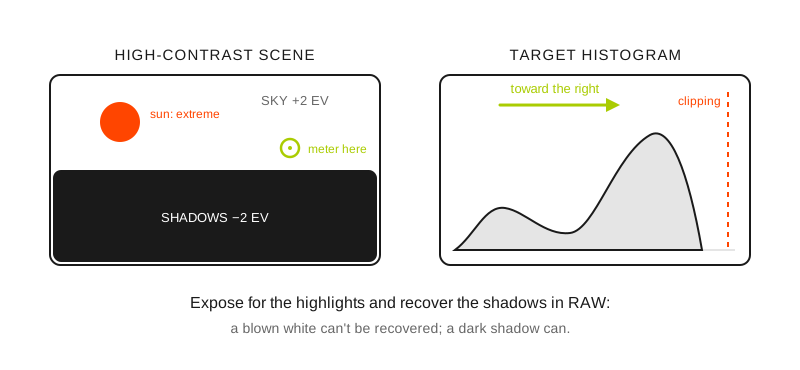
In high contrast, protect the highlights: shift the histogram to the right without touching the clipping edge.
Winter scene / high key
The meter will be fooled by the reflective elements in the scene, making the image underexposed (whites will look gray). Compensate the exposure.
Metering: Evaluative
Compensation: +2 stops in any shooting mode
ISO: Low
Dark scene / low key
When metered, the scene will be overexposed, which will make the shadows look gray. You'll need to compensate the exposure.
Metering: Evaluative
Compensation: -2 in any shooting mode
ISO: Low-medium
Bright scene / full tonal range
With highlights, midtones and shadows spread out, the meter's average reading falls close to correct. Check the histogram and compensate only if something goes off an end.
Metering: Evaluative
Compensation: Adjust only if necessary
ISO: Low
Dark and bright scene / high contrast
The meter reading will overexpose the highlights or underexpose the shadows. Place the spot meter on a midtone area and adjust according to the area you want to emphasize.
Metering: Spot
Compensation: Evaluate in the scene
ISO: Low
Backlit scene / low tonal range
The meter will generate an average setting. Adjust the exposure only if necessary.
Metering: Spot
Compensation: Evaluate in the scene
ISO: Low
Where do I meter in each scene?
High-key scene (snow, clouds): +2 stops, then recover shadows in editing.
Extreme backlight: Meter on the sky, accept silhouettes in the foreground.
Forest with clearings: Meter in an open shade area, not in the direct sunbeam.
Sunset: Meter between the sun and the horizon, avoid the solar disk.
What settings do I use in a high-contrast landscape?
Spot metering on a representative area (not the extremes). Which area to choose and why, in the strategic light metering guide.
Manual mode to keep exposure consistent across series.
ISO 100-400 to maximize dynamic range.
f/8-f/11 for optimal landscape sharpness.
What metering and what compensation do I use in each scene?
Scene: Winter, snow or sand (high key); Metering: Evaluative; Compensation: +2 stops; ISO: Low; What's at stake: Whites come out gray if you don't compensate
Scene: Dark scene (low key); Metering: Evaluative; Compensation: −2 stops; ISO: Low-medium; What's at stake: Shadows come out gray and flat
Scene: Bright scene, full tonal range; Metering: Evaluative; Compensation: Adjust only if necessary; ISO: Low; What's at stake: Little; it's the meter's most reliable reading
Scene: Sun and shade at once (high contrast); Metering: Spot on a midtone; Compensation: Evaluate in the scene; ISO: Low; What's at stake: Blown sky or shadows with no information
Scene: Backlit, low tonal range; Metering: Spot; Compensation: Evaluate in the scene; ISO: Low; What's at stake: Unintended silhouette or washed-out sky
Your camera's compensation scale goes up to ±3 stops; with snow filling the whole frame and direct sun you may need a little more than +2, but with snow and sky shared +2 is enough and +3 blows the whites with no return. Don't trust the number: check on the histogram that the mass of tones touches the right edge without piling up against it. How the dial works and in which modes it acts is in the exposure compensation guide, and the specific case of snow, measured step by step, in exposure compensation on sand and snow.
Why do my landscapes come out gray or blown out?
Metering directly on the sun (severe underexposure).
Looking for detail in all the shadows (flat image).
Not accepting silhouettes when they improve the composition.
Using fill flash in landscapes (unnatural).
Professional tips
Favorite technique: Prioritize exposing for the highlights, post-process the shadows.
In extreme situations use neutral density filters to balance the sky's exposure.
Always shoot in RAW to have maximum flexibility in post-processing.
Frequently asked questions
Do I expose for the highlights or the shadows in a landscape?
For the highlights. A blown pixel holds no data and no processing brings it back; an underexposed shadow holds degraded information that can be lifted, at the cost of some noise. The exception is the low-contrast scene, where exposing as far to the right as possible without blowing out gives the cleanest file.
Why does snow come out gray?
Because the meter is calibrated to return a middle gray and, faced with a frame full of white, it closes down the exposure until it turns it into that gray. Compensate +2 stops to give it back its real brightness. The same happens in reverse with a very dark scene: the camera opens it up until it grays it and you have to close down −2.
When do I use spot metering and when evaluative?
Evaluative when the scene has its tones spread out and no extreme dominates the frame. Spot when there is a big difference between areas (sun and shade, backlight, a light subject against a dark background) and you need to decide which area is well exposed. With spot, meter on a real midtone: grass, dry asphalt, tanned skin.
When do I compensate and when do I merge several exposures?
Compensate as long as the scene's range fits in a single file, which is most of the time if you shoot RAW. When the sky and the shadow don't fit together even by forcing the processing, shoot a bracket of exposures and merge them: the procedure is in the guide to HDR techniques and exposure blending.
Understanding the scene is understanding its exposure.
The 44 cards from Enfogram have this metering and compensation table by scene printed on them, to consult with the wind in your face and without taking off your gloves.