Blurry Photos: 8 Causes and How to Fix Them
Camera shake, subject motion, misplaced focus, diffraction or noise: how to tell the 8 causes of unsharp photos apart and which setting fixes each.

Before blaming the lens, check whether the background is sharp. If the whole frame is smeared in the same direction, it is camera shake and you fix it with shutter speed. If the background is sharp and the subject is not, the subject moved. If something in the frame is perfectly sharp but it is not your subject, the focus landed somewhere else. That three-second diagnosis separates the eight causes that follow, and five of them can be fixed without buying anything.
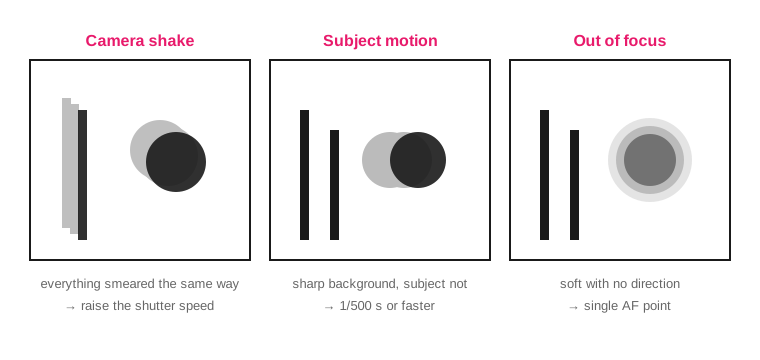
The direction of the smear tells the three most frequent causes apart before you look at any setting.
The 8 causes, with their symptom and fix
#: 1; Cause: Camera shake; How to recognize it: Whole frame smeared in the same direction; What to do: Shutter speed ≥ 1 ÷ equivalent focal length
#: 2; Cause: Moving subject; How to recognize it: Sharp background, smeared subject; What to do: 1/250 s for people walking, 1/500 s running, 1/1000 s for sports
#: 3; Cause: Focus in the wrong place; How to recognize it: There is a perfectly sharp plane, but it is not the subject; What to do: Single AF point on the eye, not automatic zone
#: 4; Cause: Insufficient depth of field; How to recognize it: One eye sharp and the other not; What to do: Stop down to f/4 or f/5.6 in portraits
#: 5; Cause: Diffraction; How to recognize it: Equally soft across the whole frame and worse the more you stop down; What to do: On full frame, avoid going past f/11–f/16 unless you need the depth of field
#: 6; Cause: High ISO and noise reduction; How to recognize it: Fine texture turned into plasticine smudges; What to do: Lower the ISO or reduce smoothing in processing
#: 7; Cause: Dirty glass or a poor-quality filter; How to recognize it: Low contrast and halos around lights; What to do: Clean the front element and remove the UV filter
#: 8; Cause: Missing output sharpening; How to recognize it: Sharp at 100% and soft when reduced in size; What to do: Apply sharpening after resizing
At what shutter speed does my hand stop shaking?
The reciprocal rule gives you the floor: with a 50 mm on full frame, 1/50 s. On a sensor with a crop factor, multiply the focal length first, because what matters is the angle covered by each pixel.
Focal length (full frame): 24 mm; Minimum speed: 1/25 s; Same focal length on APS-C 1.5×: 1/40 s
Focal length (full frame): 35 mm; Minimum speed: 1/40 s; Same focal length on APS-C 1.5×: 1/60 s
Focal length (full frame): 50 mm; Minimum speed: 1/50 s; Same focal length on APS-C 1.5×: 1/80 s
Focal length (full frame): 85 mm; Minimum speed: 1/100 s; Same focal length on APS-C 1.5×: 1/125 s
Focal length (full frame): 200 mm; Minimum speed: 1/200 s; Same focal length on APS-C 1.5×: 1/320 s
Two limits the rule does not tell you. The first: it was designed for film and for small prints. With a 45-megapixel sensor, viewing at 100% on screen, you need twice the speed for the result to look equally clean. The second: below 1/30 s handheld, some of your shots will come out blurred no matter what you do, and no setting fixes it; that is where the tripod comes in. The full treatment, with holding technique and the role of the stabilizer, is in sharp handheld photos.
The stabilizer compensates for your hand, not for the subject's movement. It gains between two and four stops depending on the system, and it is useless against cause number 2: a cyclist at 1/30 s comes out smeared with stabilization and without it.
How do I improve a blurry photo that is already taken?
It depends on which of the eight causes produced it, and it is best to say it bluntly: defocus and camera shake cannot be recovered. The information is not in the file. What processing can fix is the following.
Problem in the file: Slightly soft, correct focus; What you can recover: Quite a lot; How: Unsharp mask with radius 0.8-1.2 px on the RAW
Problem in the file: Camera shake or subject motion; What you can recover: Almost nothing; How: Recrop to disguise it or discard the shot
Problem in the file: Out of focus; What you can recover: Nothing; How: Discard
Problem in the file: Soft from noise reduction; What you can recover: Some; How: Reduce luminance smoothing and raise detail
Problem in the file: Haze from backlight or dirty glass; What you can recover: A lot; How: Raise contrast and blacks; clean the lens for next time
Working from RAW changes the margin available in the first and fourth rows of that table, because the JPEG has already applied its own sharpening and its own noise reduction and there is no going back. The comparison is in RAW or JPEG.
At what aperture does diffraction start to get in the way?
Light passing through a small hole diffracts, and each point in the scene is recorded as a disc, not a point. The diameter of that disc is approximately 1.34 × the f-number, measured in microns. At f/11 it is 14.7 microns; at f/16, 21.4.
Compare it with pixel size: a 24-megapixel full frame has 6-micron pixels, an APS-C with the same megapixels has 3.9 and a 20-megapixel Micro 4/3 has 3.3. When the diffraction disc clearly exceeds the pixel, stopping down further stops adding sharpness.
Format: Full frame 24 MP; Typical pixel: 6.0 µm; Noticeable from: f/11; Practical ceiling: f/16
Format: APS-C 24 MP; Typical pixel: 3.9 µm; Noticeable from: f/8; Practical ceiling: f/11
Format: Micro 4/3 20 MP; Typical pixel: 3.3 µm; Noticeable from: f/5.6; Practical ceiling: f/8
That does not mean f/16 is forbidden. In a landscape where you need sharp foreground and infinity at the same time, the depth of field you gain makes up for the loss from diffraction; stopping down to f/22 almost never makes up for it. The measurements for each format are in camera sensor sizes.
And if the problem is the autofocus?
Three checks, in this order.
How many points you use. The automatic zone picks the nearest, highest-contrast object, which in a portrait is usually the shoulder or the hand. A single point on the eye solves most of these cases.
Which mode. Single focus (AF-S / One Shot) locks and does not measure again: if the subject breathes or you sway 5 cm with an 85 mm at f/1.8, the eye is already out of range. With anything that moves, continuous focus.
Whether the error is systematic. Photograph a ruler tilted at 45° on a table, focus on a specific mark at f/2.8 and see where the sharp plane falls. If it always falls in front of or always behind the mark, and it repeats over several shots, it is a mismatch in the body-lens combination. Before accepting that conclusion, repeat the test with a tripod and a remote release, because camera shake imitates that symptom.
Frequently asked questions
Why are my photos blurry if I have a good camera?
Because sharpness is decided by shutter speed and focus point before gear, and a sensor with more megapixels makes any technique failure more visible. First check whether the background is sharp: if it is, the problem is the subject or the focus, not the camera.
At what shutter speed do you freeze a person in motion?
1/250 s freezes someone walking, 1/500 s a child running toward you, and 1/1000 s a player sprinting or a cyclist. If the movement crosses the frame instead of coming straight at you, go up one more stop, because the displacement across the sensor is greater.
What is a lens's sharpest aperture?
Between two and three stops below its maximum aperture: on an f/1.8 that lands at f/4 or f/5.6, and on an f/4 it lands at f/8. At maximum aperture you lose at the edges; stopped down too far you lose to diffraction across the whole frame.
Does stabilization replace the tripod?
For your own tremor it gains between two and four stops, so it lowers the floor from 1/50 s to 1/8 s with a 50 mm. For exposures of several seconds or for freezing something that moves it is no help, and some systems make the result worse if you leave them on while on a tripod.
The order of checks in the field
Look at the background, decide which of the three forms of blur you have and apply the matching fix: shutter speed, focus point or aperture. If all three are fine and it is still soft, stop down one stop from maximum aperture and clean the front element. The three controls and how they trade off against each other are in the exposure triangle guide, and the exact sharp range for each combination in the depth of field calculator.
The 44 cards from Enfogram have the minimum speeds by focal length and by subject printed on them, so you can check them on the spot and not after getting home.