Skip to content
← Glossary

Panning

Panning is a slow-shutter technique where you follow a moving subject with the camera while shooting, keeping it sharp against a blurred background.

Also known as: panning shot, motion panning
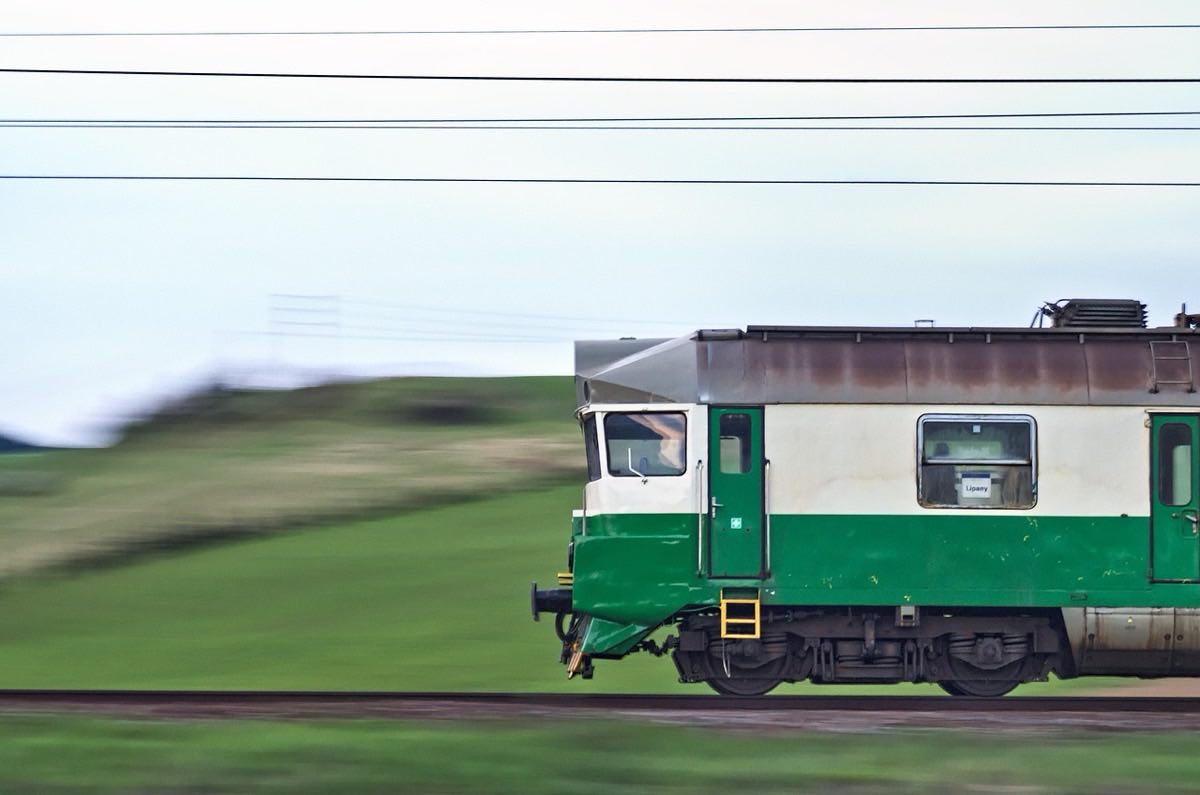
Sharp subject against a background blurred by panning

Panning (barrido) is a slow-shutter-speed technique in which you follow a moving subject with the camera while you shoot. The result: the subject comes out relatively sharp while the background turns into a horizontal blur that conveys a strong sense of speed, impossible to achieve by freezing the motion.

It requires a moderately slow shutter speed (1/30 s to 1/125 s depending on the subject's speed) and a smooth camera movement parallel to the subject's path. It has a high rejection rate: it's normal to need many attempts to get a shot with a well-defined subject.

It's a classic resource in sports and motorsport photography. To master creative shutter speeds, see the guide to shutter speeds and the article sports photography: action, emotion and the decisive moment.

  • Blog
    Manual Mode vs Aperture Priority: Which Should You Use?

    Manual mode or aperture priority: when each makes sense, with real scenarios, concrete settings and the myth of manual as the pro's mode, debunked.

  • Glossary
    Color temperature (Kelvin)

    Color temperature describes whether a light source leans orange or blue, measured in Kelvin (K). Low values are warm light and high values are cool light.

  • Guide
    Exposure in Complex Landscapes

    Landscapes pose the biggest dynamic range challenge: your sensor can't capture everything you see, so you must decide which tones to preserve.

  • Blog
    Shutter Speed: Exposure and Motion

    Shutter speed: which value freezes or blurs each kind of movement, with a table by scenario and the most common mistakes.

  • Glossary
    Shooting modes (P, A, S, M)

    The shooting modes on the dial split control of the exposure between you and the camera: program, aperture priority, shutter priority and manual.

  • Guide
    Exposure Compensation: How and When to Use It

    Exposure compensation lets you make a photo come out lighter or darker than the reading your camera calculates automatically.

  • Guide
    Exposure in Complex Landscapes

    Landscapes pose the biggest dynamic range challenge: your sensor can't capture everything you see, so you must decide which tones to preserve.

  • Guide
    Exposure Compensation: How and When to Use It

    Exposure compensation lets you make a photo come out lighter or darker than the reading your camera calculates automatically.

  • Guide
    HDR Techniques and Exposure Blending

    HDR isn't a filter: it's a technique for capturing the full range of highlights and shadows your eye sees but your camera can't record at once.

  • Guide
    Shutter Speeds

    Shutter speed controls light and motion: there is no universal correct speed, it depends on your artistic intent.

  • Guide
    Smart ISO: Choosing the Right ISO

    ISO adapts the camera to the available light while keeping your creative priorities: use the ideal ISO for each situation, not always the lowest.

  • Guide
    The Exposure Triangle, Step by Step

    The exposure triangle is the basis of light control: ISO, aperture and shutter speed work together as a balancing system.