Creative White Balance
White balance is a storytelling tool: adjusting it manually lets you create atmospheres that support your visual message.
In portraits, +200 to +300 K above the neutral value makes skin tones more flattering; the Tungsten preset (about 3200 K) used in daylight tints the whole scene blue, and that is a resource, not a mistake. The manual range runs from 2500 to 10000 K, and there you choose whether the scene is nostalgia or distance.
White balance is a storytelling tool. Colors communicate emotions: cool blues suggest calm or melancholy, warm golds evoke nostalgia or energy. Your camera's automatic white balance tries to "neutralize" the color tendencies of the light, but you can adjust it to create specific atmospheres that support your visual message.
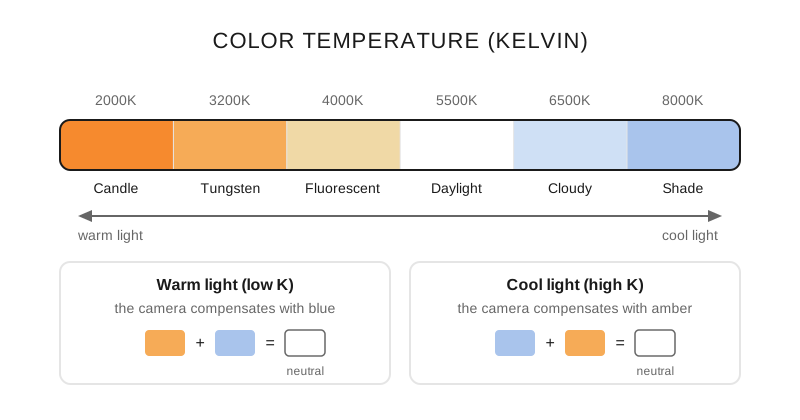
The Kelvin scale: each white balance setting compensates for the temperature of the light to reach neutral.
What does each white balance preset do?
Auto (AWB): The camera automatically adjusts white balance according to its perception of the color tendencies of the environment. It is usually effective, although small variations in light can change colors from one shot to the next.
Tungsten: Designed for household lighting, since it adds cool tones to balance color indoors. If used in other settings, the image will look very blue.
Fluorescent: To be used under fluorescent lights, this setting adds warm tones to the image. Very useful when images show a green cast.
Daylight: Use this option when shooting under direct sunlight. Here there is no filtering because the light is "white," with no color cast.
Cloudy: Overcast days naturally cast cooler tones. To balance the image, this setting adds warmer tones.
Shade: Setting for shooting in open shade, in daylight. It adds warm orange filtering and gives skin tones a more natural appearance.
Flash: Use this setting when shooting with flash; this option adds warm tones to the image, keeping skin tones from looking too cool/blue. It balances to daylight (~5500K), and the effect depends on the flash used.
Custom: Designed to let the photographer set white balance from a previously taken image with primarily white areas.
Kelvin degrees: you manually adjust the color temperature between 2500 and 10000 K.
When do I deviate the balance on purpose?
AWB setting in any situation: Reliable starting point, fine-tune in post-production.
Tungsten setting when there is white light: Cool blue tones, melancholic atmosphere.
Daylight setting when there is warm light: Warm golden tones, cozy ambience.
Set in advance with a gray card: More precise setting, showing the camera a neutral gray card for white balance evaluation.
What setting do I use in each scene?
Scene: Outdoor portraits; Preset: Daylight or AWB; Suggested temperature: 5500 K, +300 K to warm up; Result: skin with a warm tone, no cast
Scene: Mixed interiors; Preset: AWB or Tungsten depending on the dominant light; Suggested temperature: 3200 – 4000 K; Result: the subject neutral, the background tinted
Scene: Sunsets; Preset: Daylight; Suggested temperature: 5500 K fixed; Result: preserves the real orange of the light
Scene: Open shade with blue sky; Preset: Shade; Suggested temperature: around 7500 K; Result: corrects the blue of the shade
Scene: Creative cool mood; Preset: Tungsten under daylight; Suggested temperature: 3200 K; Result: blue scene, atmosphere of distance
Scene: Creative warm mood; Preset: High manual Kelvin; Suggested temperature: 7000 – 10000 K; Result: saturated gold, memory and nostalgia
The rule that explains the whole table: the value you choose is the temperature the camera considers white, so setting a higher number than the actual light warms the image and setting a lower one cools it. That's why Tungsten at noon comes out blue and Shade in the sun comes out orange. The link between those tints and what they convey is developed in the color theory guide, and the specific outdoor case in white balance outdoors.
The mistakes that tint an entire session
Obsessing over a "perfect" White Balance and losing the natural atmosphere.
Not considering multiple light sources in the same scene.
Using flash with an incorrect White Balance (mixed temperatures).
Relying solely on AWB without understanding the alternatives.
Professional tips
Shoot in RAW: total flexibility to adjust in editing.
Practical rule: slightly warm setting (+200K) in portraits for flattering skin tones.
In mixed conditions, prioritize the White Balance for the main subject, accepting casts in the background.
When you adjust white balance, you stop correcting mistakes and start telling the truth of the light.
Frequently asked questions
Does white balance matter if I shoot RAW?
It matters less, but it matters. In RAW the temperature is stored as metadata and changing it later costs no quality, so you can readjust it entirely in processing; what is lost is consistency, because reviewing a hundred photos without a coherent starting point takes longer than getting it right in camera. If you shoot JPEG, the balance is baked into the file and correcting it degrades the color.
How do I handle a scene with mixed lights?
Set the white balance for the main subject and accept the tint in the background: trying to neutralize two sources of different temperature at once leaves both wrong. If you use flash indoors with light bulbs, the other way out is to match the flash to the ambient light with an orange gel and set the camera to Tungsten.
What is the gray card for?
To set a real reference white: you photograph the card under the same light as the subject and tell the camera (or the processing software) that this gray is neutral. It is the fastest method when there are many shots under the same light, and also the most useful when the scene is dominated by a color that fools the automatic mode, like green grass or a red wall.
What temperature gives a cool atmosphere without looking like a mistake?
Between 3200 and 4000 K in daylight produces an obvious but legible blue; below 3000 K the scene starts to read as a camera error rather than a decision. In portraits it is also wise to watch the skin, which is the first thing to give away an exaggerated tint.
What to decide before the first shot
Two things: which source rules the scene and whether you want neutrality or atmosphere. With that, the preset picks itself, and the fine-tuning fits on one button. If the session is long and the light doesn't change, set a manual Kelvin and forget about the automatic mode correcting from one photo to the next.
The 44 cards from Enfogram come with this temperature table printed, so you can choose the Kelvin with the scene in front of you and not in the menu.