RAW vs JPEG: A Strategic Decision
Choosing between RAW and JPEG is strategic: RAW gives maximum processing flexibility; JPEG offers immediate convenience with limited options.
Shoot RAW unless you have to deliver in minutes. The difference is measured in tone levels: a RAW stores 12 or 14 bits per channel (4,096 or 16,384 levels) versus the 8 bits and 256 levels of a JPEG. That margin is what decides whether a slightly blown-out sky comes back or doesn't.
RAW gives maximum development flexibility in exchange for time and knowing how to edit. JPEG solves immediate delivery and cuts back what you can do afterward. The decision depends on your workflow, the final use of the images and how much developing you're willing to do.
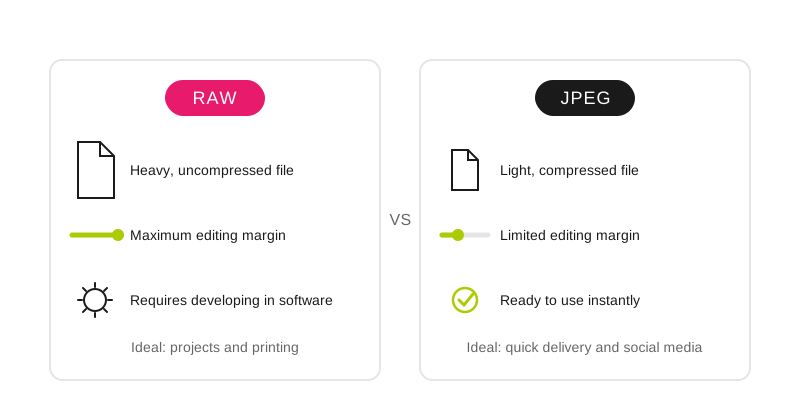
RAW keeps all the information for deep editing; JPEG sacrifices editing margin in exchange for immediacy and reduced size.
How do RAW and JPEG differ?
RAW:
Unprocessed format: the data comes off the sensor with no camera decisions applied (most cameras compress it losslessly, and some also offer a lossy compressed RAW).
Each camera manufacturer has a different file extension.
Needs a developing program before it can be used in any other application.
Very heavy file.
Keeps the most information about an image and contains more colors and dynamic range.
Provides broad control over exposure, colors, saturation, white balance, etc.
JPEG:
Industry-standard file format.
The same file extension on all cameras (.jpg).
It's processed by the camera, so it can be opened in a great many programs.
Compressed file, so it weighs little.
Because it's compressed, some information is removed from the image.
Capable of displaying millions of colors in a highly compressed file.
It's easily post-processed, but there will be a small loss of quality every time it's saved.
When do I use each format?
RAW:
Photojournalism.
If the image will be heavily processed: fashion, graphic design, etc.
When you need perfect white balance and tones, or want total control over the final look.
If the image will be used for prints.
JPEG:
Everyday snapshots.
Shooting for immediate viewing.
For use on social media.
If you have little space on your memory card or hard drive.
If you're going to shoot in bursts.
What do I gain and lose with each?
What you're comparing: Color depth; RAW: 12 or 14 bits per channel (4,096–16,384 levels); JPEG: 8 bits per channel (256 levels)
What you're comparing: White balance; RAW: Changed in development at no cost; JPEG: Baked into the file; correcting it degrades it
What you're comparing: Recovery margin; RAW: A sky one stop overexposed usually comes back; JPEG: One stop too much rarely comes back
What you're comparing: File size; RAW: Several times that of the JPEG of the same shot; JPEG: The lighter of the two, by far
What you're comparing: Burst; RAW: The buffer fills sooner and the camera slows down; JPEG: Handles much longer sequences
What you're comparing: Ready to deliver; RAW: No: you have to develop and export; JPEG: Yes: comes out of the camera publishable
What you're comparing: Compatibility; RAW: Each manufacturer's own extension; JPEG: .jpg on any device and program
What you're comparing: Re-edits; RAW: The original is never touched; development is reversible; JPEG: Loses some quality every time it's re-saved
The row that decides almost every argument is white balance: in RAW it's a parameter you change later with no penalty, and in JPEG it's a decision the camera has already made for you. If you often shoot under mixed light (weddings, interiors, stages) that alone justifies the format; how to use it to your advantage is in the creative white balance guide.
Most common camera manufacturers and RAW file extensions
Manufacturer: Canon; Extensions: .crw, .cr2 and .cr3
Manufacturer: Nikon; Extensions: .nef
Manufacturer: Kodak; Extensions: .dcs
Manufacturer: Sony; Extensions: .arw, .sr2
Manufacturer: Fuji; Extensions: .raf
Manufacturer: Samsung; Extensions: .srw
Practical application
RAW: Important projects, difficult lighting conditions, creative projects.
JPEG: Social events, casual photography, immediate delivery.
RAW+JPEG: Maximum flexibility, immediate backup (requires more space, and doubles what you have to organize afterward: the file management guide covers how not to get lost).
Fine JPEG: high-quality fine JPEG for social media, standard prints.
Frequently asked questions
Is the difference between RAW and JPEG noticeable in a well-exposed photo?
On screen and with easy light, almost not at all: the camera JPEG is well processed and often looks better at first. The difference appears when something goes sideways (a white at the limit, a strange color cast, a shadow that has to be lifted two stops) and in how much the file holds up before breaking into bands.
Can I convert a JPEG to RAW?
No. The reverse conversion is impossible because the JPEG has already discarded the information: the sensor's 12 or 14 bits were reduced to 8 and the white balance, contrast and sharpness were applied irreversibly. Changing the file extension gets you nothing back.
How much space does a RAW take compared with a JPEG?
Several times more, and the exact ratio depends on the model, the resolution and whether your camera compresses the RAW losslessly. In practice, plan your cards and disk thinking in RAW: with the same space, quite a few fewer photos fit, and the burst buffer fills sooner.
When does it make sense to shoot only JPEG?
When delivery is immediate and the file won't be edited: sports press sending from the stadium, event photography with on-site printing, framing tests or reference shots. Also when you're going to shoot long bursts and buffer depth matters more than development margin.
The 44 Enfogram cards come with the settings printed on them to get the shot right on the spot, which leaves the least developing pending.